🔷 About HTML Web Storage API - 2
A Thread🧵 👇
📌 The localStorage Object
→ The localStorage object stores the data with no expiration date.
→ The data will not be deleted when the browser is closed, and will be available the next day, week, or year.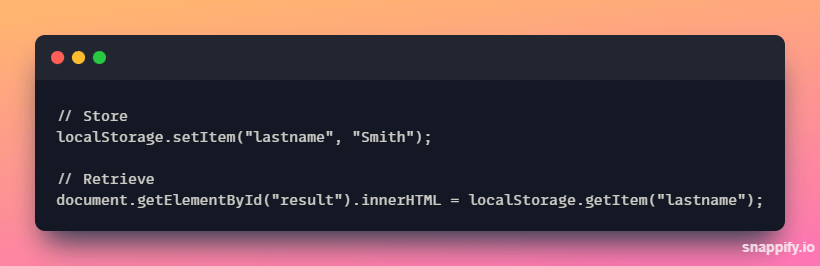
→ Example explained:-
• Create a localStorage name/value pair with name="lastname" and value="Smith" .
• Retrieve the value of "lastname" and insert it into the element with id="result".
→ The example given in the above tweet could also be written like this,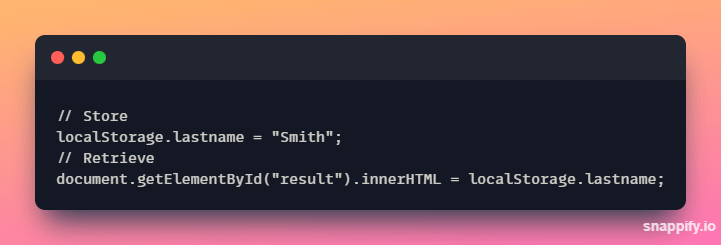
→ The syntax for removing the "lastname" localStorage item is as follows.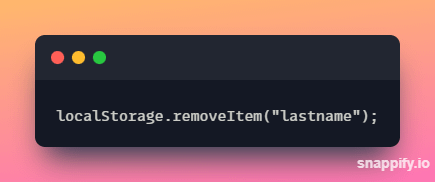
⛔ Note: - Name/value pairs are always stored as strings. Remember to convert them to another format when needed!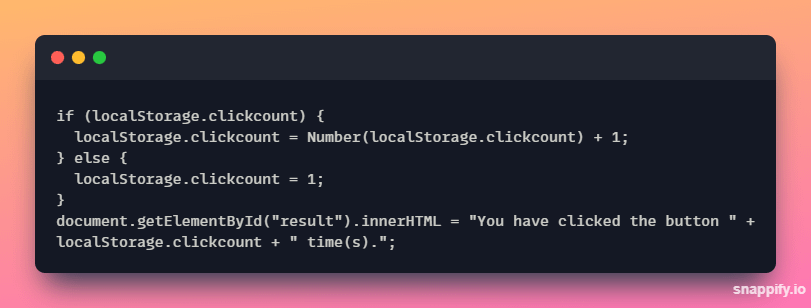
📌 The sessionStorage Object
→ The sessionStorage object is equal to the localStorage object, except that it stores the data for only one session.
→ The data is deleted when the user closes the specific browser tab.
→ The following example counts the number of times a user has clicked a button, in the current session.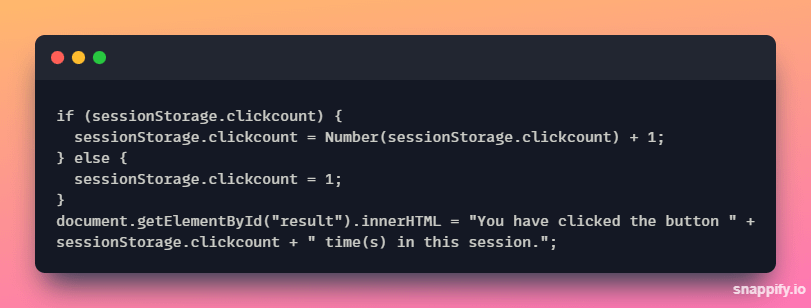
Thanks for reading this thread ❤️
If you like it , make sure you:
🔷 Like the tweet
🔷 Retweet the first tweet ⚡
For more content , follow:
@MrunayU

Mrunay Uttarwar
@MrunayU
🌐 Front End Dev 💻 Transitioning into Web3 🚀 Content Creator 📝 Always learning and sharing my journey 💻 Let's connect and geek out!