🔷 About HTML Layout
A Thread🧵 👇
📌 HTML Layout Elements
→ HTML has several semantic elements that define the different parts of a web page.
• <header>
♦️ Defines a header for a document or a section.
• <nav>
♦️ Defines a set of navigation links.
• <section>
♦️ Defines a section in a document.
• <article>
♦️ Defines an independent, self- contained content.
• <aside>
♦️ Defines content aside from the content (like a sidebar).
• <footer>
♦️ Defines a footer for a document or a section.
• <details>
♦️ Defines additional details that the user can open and close on demand.
• <summary>
♦️ Defines a heading for the <details element.
📌 HTML Page Structure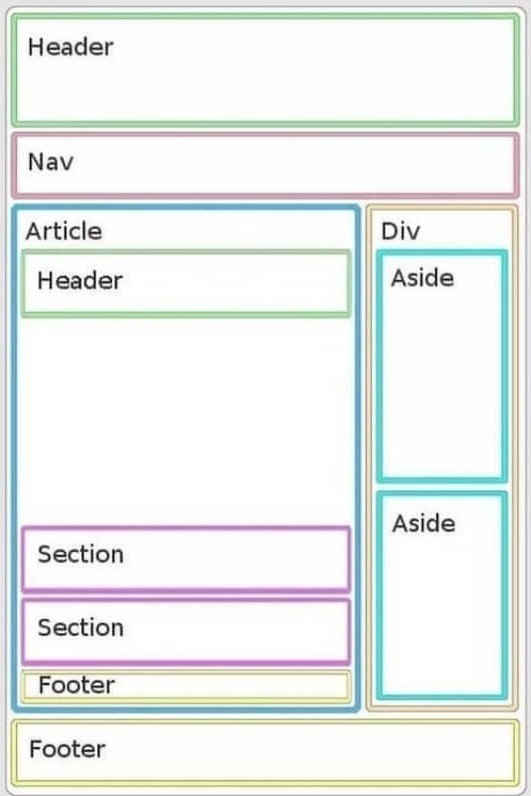
📌 HTML Layout Techniques
→ There are four different techniques to create multicolumn layouts.
→ Each technique has its pros and cons
1️⃣ CSS framework
2️⃣ CSS float property
3️⃣ CSS flexbox
4️⃣ CSS grid
1️⃣ CSS FRAMEWORKS
→ If you want to create your layout fast, you can use a CSS framework, like:-
• Bootstrap
• W3.CSS
• Tailwind CSS
• Materialize CSS
2️⃣ CSS FLOAT PROPERTY
→ It is common to do entire web layouts using the CSS float property.
→ Float is easy to learn - you just need to remember how the float and clear properties work.
→ Disadvantages - Floating elements are tied to the document flow, which may harm the flexibility.
3️⃣ CSS FLEXBOX LAYOUT
→ Use of flexbox ensures that elements behave predictably when the page layout must accommodate different screen sizes and different display devices.
4️⃣ CSS GRID LAYOUT
→ The CSS Grid Layout Module offers a grid-based layout system, with rows and columns, making it easier to design web pages without having to use floats and positioning.
Thanks for reading this thread ❤️
If you like it , make sure you:
🔷 Like the tweet
🔷 Retweet the first tweet ⚡
For more content , follow:
@MrunayU

Mrunay Uttarwar
@MrunayU
🌐 Front End Dev 💻 Transitioning into Web3 🚀 Content Creator 📝 Always learning and sharing my journey 💻 Let's connect and geek out!