🔷 About HTML Form Attributes - 1
A Thread🧵 👇
📌 HTML Form Attributes
→ We will describe the different attributes for the HTML <form> element.
→ Different HTML Form Attributes
1️⃣ The Action Attribute
2️⃣ The Target Attribute
3️⃣ The Method Attribute
4️⃣ The Autocomplete Attribute
5️⃣ The Novalidate Attribute
6️⃣ The Enctype Attribute
7️⃣ The Name Attribute
8️⃣ The Rel Attribute
9️⃣ The Accept-Charset Attribute
1️⃣ The Action Attribute
→ The action attribute defines the action to be performed when the form is submitted.
→ Usually, the form data is sent to a file on the server when the user clicks on the submit button.
→ In the example below, the form data is sent to a file called "action_page.php".
→ This file contains a server-side script that handles the form data.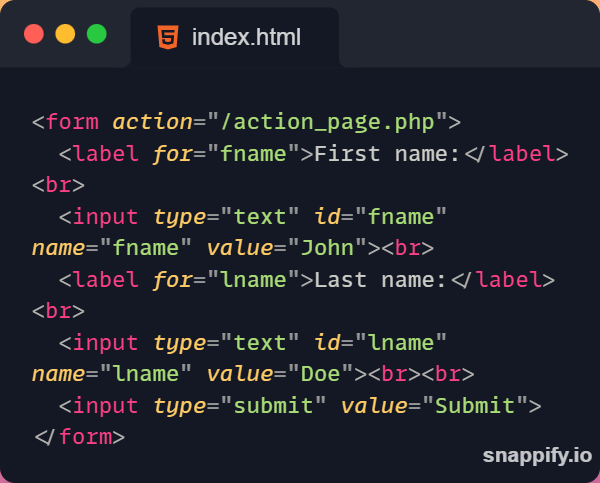
2️⃣ The Target Attribute
→ The target attribute specifies where to display the response that is received after submitting the form.
→ The target attribute can have one of the following values:-
→ Different target attribute values
• _blank
♦️ The response is displayed in a new window or tab.
• _self
♦️ The response is displayed in the current window.
• _parent
♦️ The response is displayed in the parent frame.
• _top
♦️ The response is displayed in the full body of the window.
⛔ Note:- The default value is _self which means that the response will open in the current window.
Thanks for reading this thread ❤️
If you like it , make sure you:
🔷 Like the tweet
🔷 Retweet the first tweet ⚡
For more content , follow:
@MrunayU

Mrunay Uttarwar
@MrunayU
🌐 Front End Dev 💻 Transitioning into Web3 🚀 Content Creator 📝 Always learning and sharing my journey 💻 Let's connect and geek out!